Development Tool  ·  PostgreSQL  ·  Read-only  ·  v0.1.0

DBNavigator

Explore relational data without writing a single JOIN

DBNavigator is a standalone local tool that lets development teams visually inspect PostgreSQL databases. Pick any record, instantly see everything that depends on it across foreign-key chains, and pivot to any linked row with one click — no SQL required.

Spring Boot 3.3 Angular 20 Java 21 PostgreSQL Read-only · SELECT only Auto FK discovery No installer

The Problem

Raw SQL is not enough for dependency debugging

When a bug touches data spread across five or ten linked tables, writing ad-hoc JOINs is slow, fragile, and hard to share with teammates. DBNavigator lets you start from any record and follow its FK relationships interactively — no query writing required.


How It Works

Three steps to full dependency context

1

Connect & browse

Enter your PostgreSQL credentials. DBNavigator auto-discovers all schemas, tables, and foreign keys. Filter by name and select your starting table.

2

Search & pick a master record

Search any column across all rows — not just the current page. Click a row to make it the master record, the anchor for exploration.

3

Explore & pivot

The Inspector panel lists every dependent table and related row. Click any linked ID to promote it to master and keep drilling down.


Core Capabilities

Built for data debugging workflows

🔍

Column-level full-table search

Search any column across all records, not just the current page.

🔗

FK dependency traversal

Follows both incoming and outgoing foreign-key relationships, depth- and node-capped for safe use on large schemas.

📐

ER/UML relationship preview

Visualises direct FK relationships for the selected table at a glance.

📊

Resizable paginated data grid

Handles wide, dense datasets with resizable columns and configurable page size.

🛡️

Strictly read-only

Only SELECT statements are generated — safe to point at production mirrors or shared dev databases.
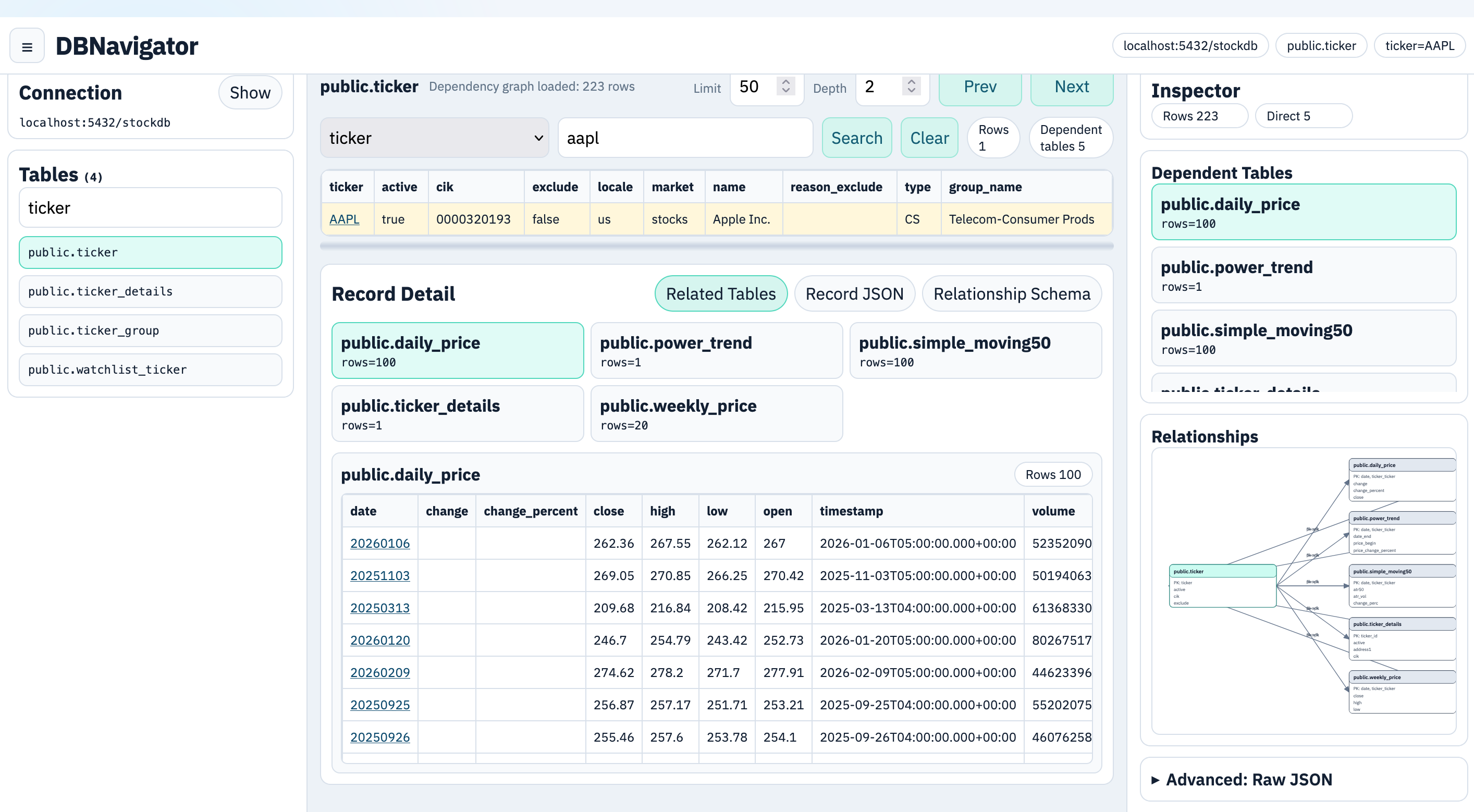
Product Screenshot

Three-panel layout

DBNavigator three-panel user interface showing connection sidebar, record grid, and inspector panel

Left — connection form & table list  ·  Centre — record grid with column search  ·  Right — inspector with dependent tables & FK relationships

1-click master record selection
Auto FK schema discovery
0 SQL needed to explore

Tech Stack

Modern, self-contained toolchain

Packages as a single fat JAR that serves the compiled Angular frontend. No separate web server or installer — just run and open your browser.

Spring Boot 3.3 Angular 20 PostgreSQL Java 21 Maven 3.9 Node.js 20

Getting Started

Up and running in three commands

# 1. Build the Angular frontend
./scripts/build-frontend.sh

# 2. Package as a fat JAR
mvn -DskipTests package

# 3. Start the application
./scripts/run.sh

Then open http://127.0.0.1:8080. Windows users can use scripts\build-frontend.bat and scripts\run.bat.